
Amplify CM supports searching and filtering the messages and makes the process of replying to users more swift.
You can easily search and filter messages using the two components.
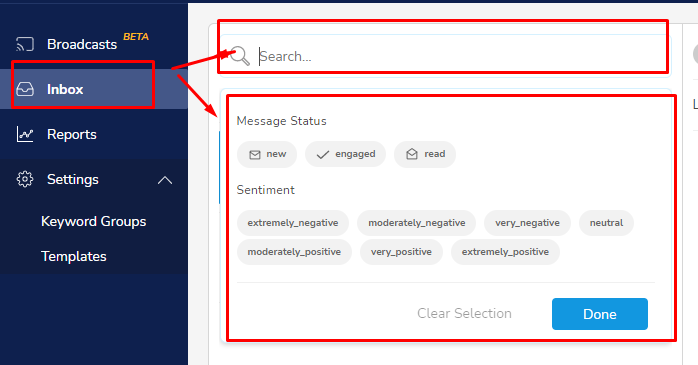
Searching :
A search tab is provided at the top which enables searching the messages via below parameters.
- Typing in a phone number (for SMS accounts)
- Typing the username (for social media platforms (i.e. Instagram, Facebook or Twitter)
Filtering :
A wide range of filter options are provided so that you can easily choose them as per your convenience and sort the messages.
- Keywords
- Intents
- Sentiment Rating
- Tags
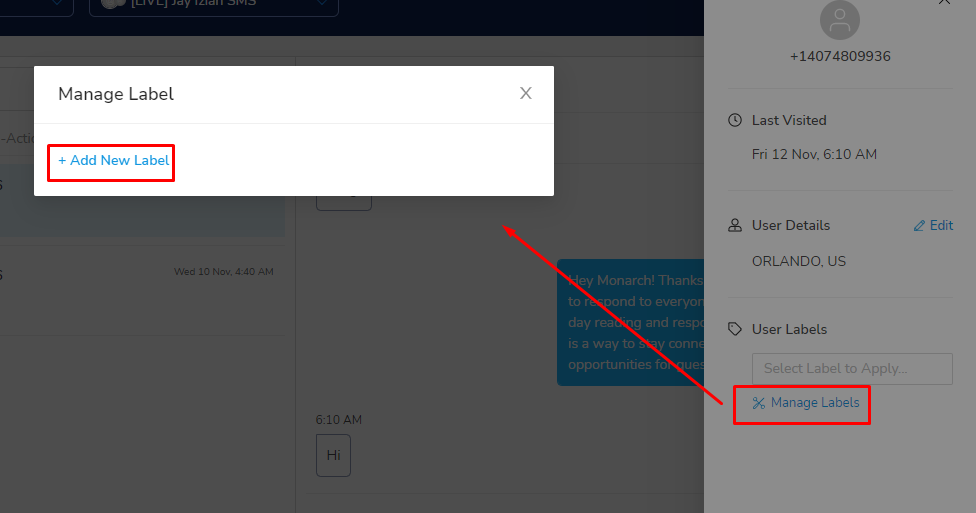
- Custom Labels : if you wish to create a custom label to filter the messages you can easily create a filter by following below steps :
- Locate the user detail tab at the top right side.
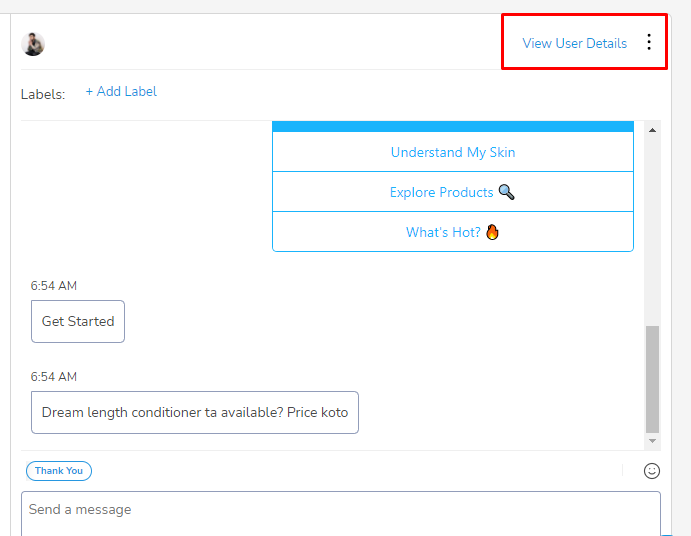
2. Click on the tab and you will be able to see Manage Labels tab.
3. Click on the same and tab will give you option to add a new label.
Please be informed that the functionality of all the above mentioned filters including tags is similar to comments & mentions and these are only visible on messages coming from the end user.
Comments
0 comments
Please sign in to leave a comment.