
The Ads Manager is where you create and coordinate your ad campaigns. You can navigate there from the Business Manager.
Let’s have a look at this map to get an idea of how to navigate a brand new Ads Manager dashboard :
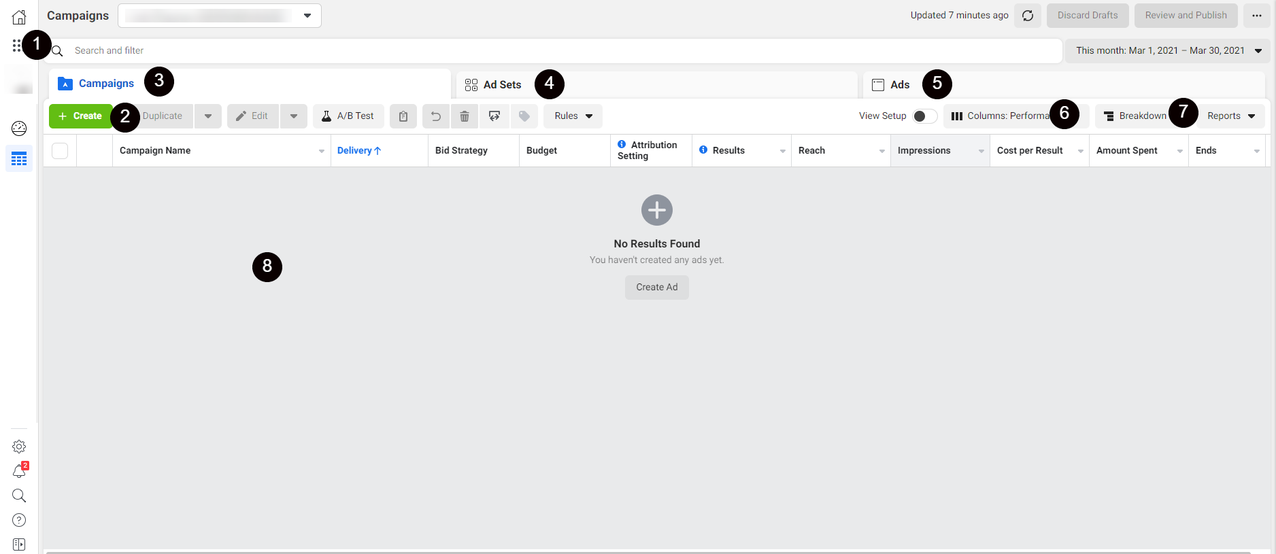
- Main Navigation Menu: Click the dots icon to navigate to other tools like Business Manager or Audiences.
- Create New Ad Campaigns: Click here to make new ad campaigns.
- Campaign View: This view will give you info on all of your Facebook campaigns once you start running them.
- Ad Set View: This view will give you information on each of your ad sets so you can compare them.
- Ads View: This view will give you information on each ad you are running.
- Columns: Toggle different columns in this drop-down bar to display various metrics about your campaigns, ad sets or ads.
- Campaign Breakdown: Breakdown allows you to filter your results by time, delivery, or action.
- The Data Field: When you start making ad campaigns, this is the area all your data will be displayed in.
Comments
0 comments
Please sign in to leave a comment.