
Paid:
Click To Direct Messages (CTDM) - Ads that click to Instagram Direct are shown in Instagram feed or Stories and allow people to start a message thread with your business by clicking on your ad. Here you can interact with people directly to complete purchases, answer questions or offer support.
CTDM (Click-to-Direct-Message): The Best Paid Mechanism for Instagram Ads
CTDM is revolutionising how businesses connect with their audience through Instagram ads. By allowing users to start direct conversations with your brand through a simple click or comment, CTDM transforms paid ads into powerful engagement tools.
Why CTDM Stands Out as the Best Paid Mechanism?
- Instant Engagement: With CTDM ads, users can click or comment to instantly start a direct message conversation, creating a personalized experience that builds stronger connections with your audience.
- Higher Conversions: By simplifying interactions, CTDM drives users from interest to action seamlessly, increasing website traffic, leads, and sales.
- Comment Responder for Paid Posts: Automatically respond to comments on paid posts to ensure every interaction gets a prompt, personalized reply. This keeps users engaged while saving your team valuable time.
- Increased Visibility: CTDM cuts through the crowded Instagram space, placing your brand in premium spots like feeds, Stories, and Explore pages, ensuring your ads get the attention they deserve.
CTD - Click to Direct IG ad
1. Comment Responder: A Comment Responder is an automated system that sends a customized direct message (DM) to users who comment on a specific Instagram post. This helps in engagement, lead generation, and driving conversions. When a user comments on your post, they receive a personalised message in their DM along with a Call-to-Action (CTA) that encourages them to take the next step, such as visiting a website, signing up, or making a purchase.
(i) (ii)
(i) User commented on a post
(ii) User received personalised message in the DM.
How It Works?
1. User comments on an Instagram post.
2. An automated DM is sent to the user.
3. CTA in the message encourages the user to take action.
4. User clicks on the CTA, initiating a conversation or conversion.
2. Ice Breakers : Start a conversation with a business with a list of frequently asked questions. Ice Breakers provide a way for users to start a conversation with a business with a list of frequently asked questions. A maximum of 4 questions can be set via the Ice Breaker API. Please Note : This feature is currently not available on desktop.
In the above screenshot, you can see a ice breaker button with the name "Wish us Happy Diwali in chat & we'll wish you back with a gift".
Note: We can add up to 4 buttons as Ice breaker.
3. Private Replies (DM) : Reply to Post Comments with a single message on Instagram. Private Replies allows Businesses to reply to comments made on their posts with a single message on Instagram. When using this feature, the user will get a message with a reference link to the comment that is getting the reply. Private replies are allowed within 7 days, excepting Instagram Live, of the creation date of the comment. Please note that Private Replies do not open the 24 hour window for standard messaging.
4. Persistent Menu - Enable users to discover and interact with core features of the Page.
5. Marketing Messages - Marketing Messages is Meta’s newly released feature on Facebook Messenger and Instagram Messaging, allowing brands to send free, regular notifications to opted-in users. After a person opts in to receiving marketing messages, you can send the person a messages on a daily, weekly, or monthly cadence depending on which cadence the person selected.
Use Case: Using the feature, businesses can turn customers into frequent buyers by offering them to opt in for promotional updates, new product announcements, appointment reminders, special discounts, loyalty program updates etc.
Use Case: Marketing messages can be used for promoting your events as well. You can use marketing messages for inviting customers to attend in-store or live shopping events. Once they sign up for the event, you can follow up with regular updates and reminders about the event.
Use Case: Live shopping events are a great strategy to multiply social engagement. By sending notification messages to customers who opted in, you can build hype around the event while reaching out to an already engaged audience. Ultimately, you have a good chance of increasing the number of attendees and encouraging engagement, such as likes, shares, and comments.
Opt-in Marketing Message
6. Broadcast Message:
A broadcast message on Instagram (Meta Platform) is a one-to-many communication feature that allows you to send updates, announcements, and exclusive content directly to the subscribed users. It helps creators, businesses, and influencers engage with their audience in a more direct and interactive way.
Use case:
(i)Product Launches & Announcements – Inform subscribed users about new arrivals, upcoming events, or updates.
(ii)Exclusive Deals & Promotions – Share discounts, limited-time offers, or early access to sales.
(iii)Community Engagement – Keep followers engaged with behind-the-scenes content, polls, and Q&A sessions.
(iv)Event Invitations – Promote webinars, live sessions, or in-store events.
(v)News & Updates – Share important business or brand-related news with the subscribed users.
Broadcast
Chatbot build specification :
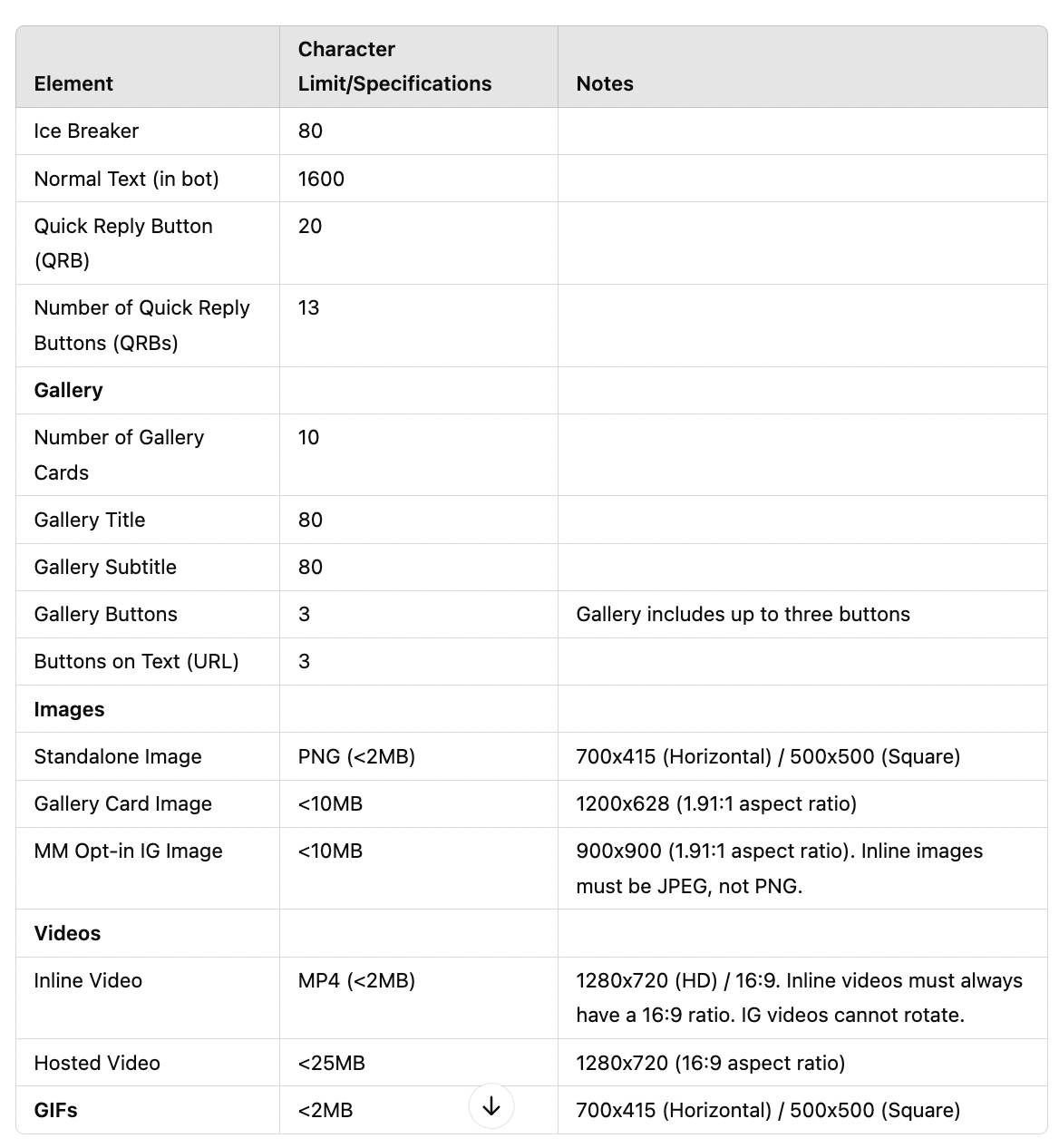
Notes :
- Only images and texts are applicable in the Instagram user journey.
- Videos, audios, and GIFs are not supported.
- When adding buttons to text, the text can be only 80 characters long.
QR(Quick Replies) or QRBs(Quick Reply Buttons) : QRBs popularly know as Quick Reply Buttons are the response buttons presented to user after a question is populated. There can be a question and multiple QRBs. When user selects any QRB a response is presented to user in messenger window based on the QRB message.
Quick Replies allow you to get message recipient input by sending buttons in a message. When a quick reply is tapped, the value of the button is sent in the conversation, and the Messenger Platform sends amessagesevent to user.
User Experience
In the above screenshot there are 3 QRBs built which are Diwali Party, Friends & Family and Colleagues.
Quick replies provide a way to present a set of up to 13 buttons in-conversation that contain a title and optional image, and appear prominently above the composer. You can also use quick replies to request a person's location, email address, and phone number.
Text Quick Reply text reply enables you to ask a customised response to the question.
User Phone Number Quick Reply :
The user phone number quick reply allows you to ask a user for their phone number. When the phone number quick reply is sent, the Messenger Platform will automatically pre-fill the displayed quick reply with the phone number from the user's profile information.
If the user's profile does not have a phone number, the quick reply will not be shown. The bot will not receive the phone number until the user clicks the quick reply.
User Email Quick Reply :
The user email quick reply allows you to ask a user for their email. When the email quick reply is sent, the Messenger Platform will automatically pre-fill the displayed quick reply with the email from the user's profile information.
If the user's profile does not have an email address, the quick reply will not be shown. The bot will not receive the email until the user clicks the quick reply.
Best Practices
1. Use quick replies to prompt for specific next steps.
2. Be brief — long quick replies will be truncated.
3. Don't use for actions you'd like to be permanent: quick replies disappear after the next message.
Gallery :
The generic gallery or template is a simple structured message that includes a title, subtitle, image, and up to three buttons. You may also specify an action object that sets a URL that will be opened in the Messenger webview when the template is tapped.
Above Image shows format for the gallery:
(i) Gallery contains an Image
(ii) Title [Darker font]: Phool Diwali Festivities collection Rs 385/-
(iii) Subtitle [Lighter Font]: A perfect Diwali gift with Patakha.
(iv) 2 buttons attached to it.
Button 1 - Shop Now
Button 2 - Share on WhatsApp
Note: We can put maximum of 3 buttons
We can create multiple structured message just like above linked with each other which will be presented to user in carousel format and user can scroll from left to right.
The End
Comments
0 comments
Please sign in to leave a comment.